Spec Selector
Equipment selection platform for manufacturers: from project schedules to priced line items
A platform for equipment manufacturers and their reps: it reads the schedules in a bid set, matches the items in the manufacturer’s scope to its product line, prices them, and hands the engineer the rows that need judgment.
- 10–20 minutes
- selection per document with the system (instead of 1–2 hours by hand)partner’s preliminary estimate; not a measurement; not a US benchmark
- ≈50%
- of documents processed with no manual intervention (share of documents, not row accuracy)partner’s preliminary estimate; not a measurement; not a US benchmark
How the platform started
The YYTECH team built Vent Selector, a selector of fans, dampers, and accessories, for a fan and damper manufacturer together with an engineering partner. Vent Selector is in production use. The partner worked with other manufacturers that had the same task. They needed the same kind of selection, but against their own catalogs, prices, and rules. Building separate software for every manufacturer would mean repeating the same work many times. YYTECH moved the shared parts into a platform: document intake, recognition, review, roles, channels, and cost tracking. The YYTECH team packaged each manufacturer’s domain logic as a module.
The manual workflow
A request arrives as a bid set with equipment schedules. An application engineer or a rep finds the items in scope among the schedule sheets. Each tag names another manufacturer’s basis-of-design model, so it has to be crossed to the manufacturer’s own products and checked against the catalog: CFM and static pressure for fans, MBH at the scheduled water temperatures for heating units, and kVA, voltages, and breaker frames for electrical equipment. Then come the price, discounts, pack quantities, availability, and lead time, and finally the quote. By the partner’s preliminary estimate, one document takes 1–2 hours by hand. In the US, the selection lands inside the submittal cycle. Schedules name a basis of design “or approved equal.” The manufacturer or its rep picks its own item for each tag, quotes it to the bidding contractor, and later proves the match in a submittal: product data, performance at the scheduled conditions, listings, and deviations from the basis of design. The engineer of record approves it, approves it as noted, or asks to revise and resubmit. Fast, accurate selection helps a manufacturer get its equipment on the job.
Shared and configured
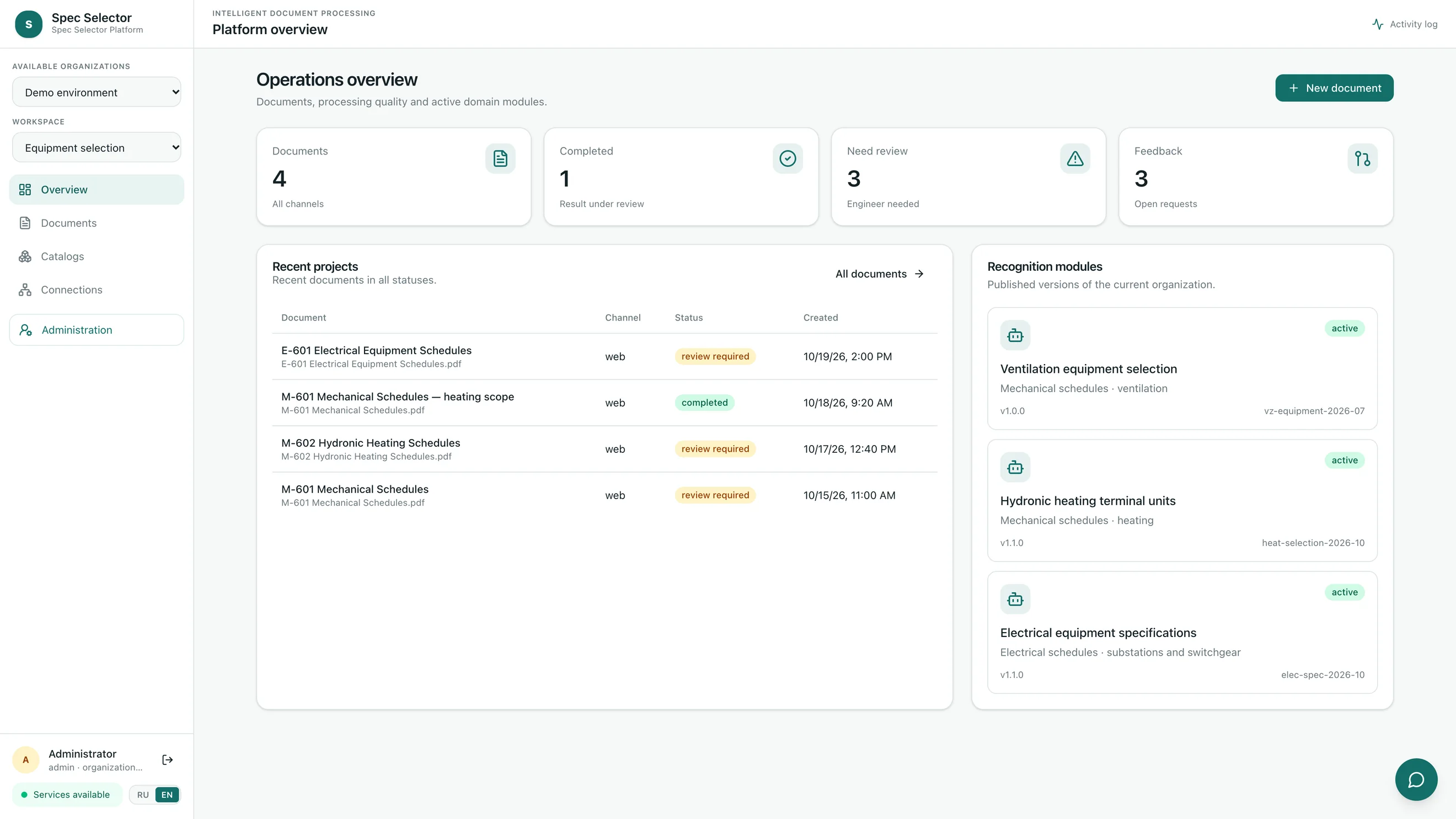
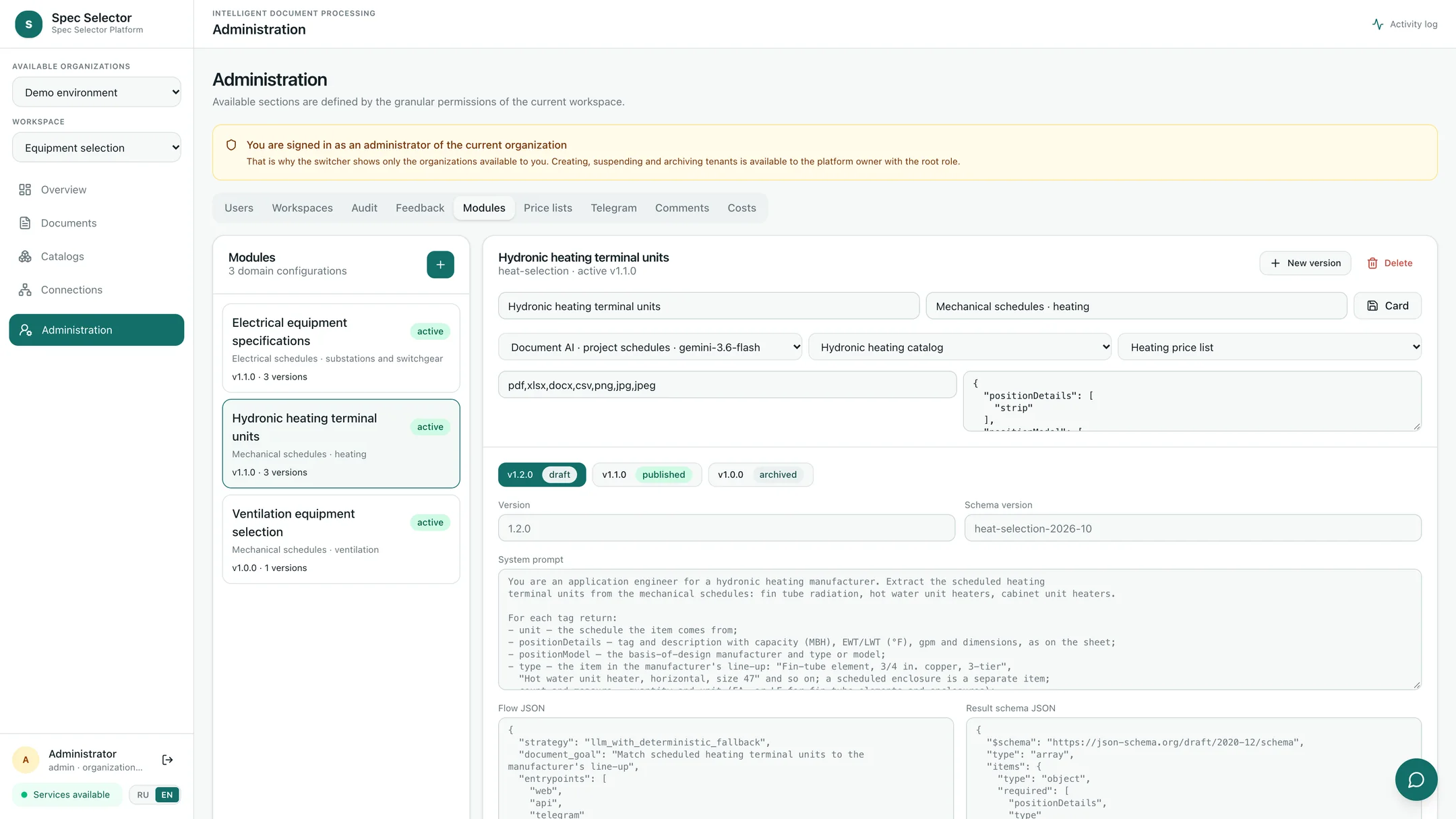
The workflow is the same for every manufacturer, while each manufacturer keeps its own catalog, rules, and prices. A module describes the document type and the fields to extract. It holds the prompt and result schema, normalization rules, the catalog, the price list, and the profile of recognition models. Module settings are edited in a draft and published as a separate version. The demo environment of the platform runs three modules: ventilation equipment selection, hydronic heating terminal units, and electrical equipment schedules (the interface names this module “Electrical equipment specifications”). They follow the same workflow in one organization, with different catalogs, prices, and rules.
What comes in
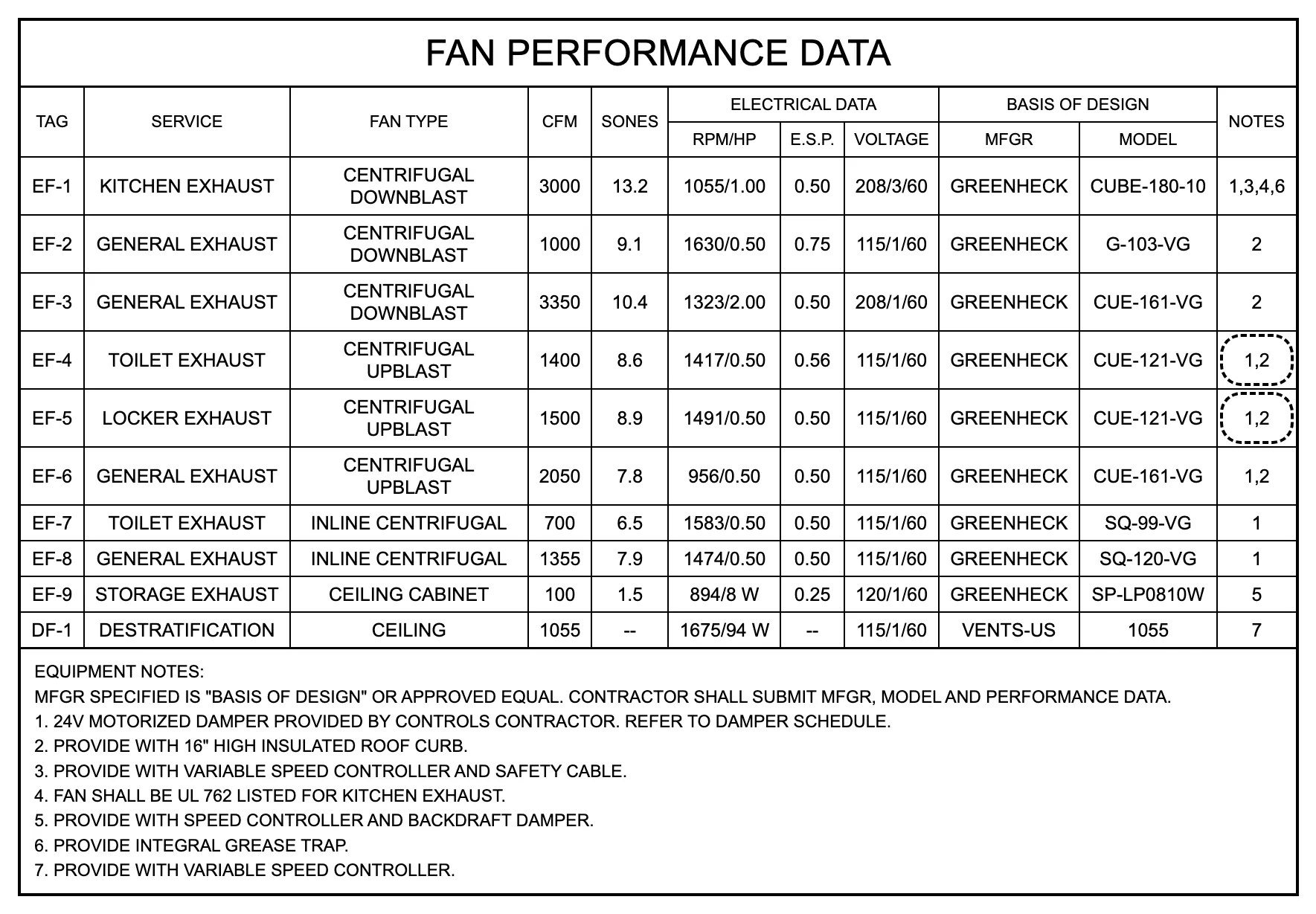
The examples are three schedule sheets of one bid set: M-601 Mechanical Schedules, M-602 Hydronic Heating Schedules, and E-601 Electrical Equipment Schedules. M-601 carries fan performance data, AHU supply and return fans, fire/smoke and motorized dampers, cabinet unit heaters, diffusers, and louvers. Rows are identified by equipment tags, not line numbers. The duty is written in CFM and in. w.g., horsepower and watts share one column, some cells are empty, and every tag names a basis of design. M-602 schedules fin tube radiation and hot water unit heaters, with capacity in MBH, entering and leaving water temperatures, gpm, tube size, tiers, and element length; an enclosure is a separate item. The same sheet also carries boilers, pumps, an expansion tank, and an air separator, all furnished by others. E-601 describes a double-ended secondary unit substation: two 2500 kVA, 13.8 kV–480Y/277 V transformers, 15 kV primary sections, a standby generator without quantity, an outdoor enclosure, low-voltage switchgear sections, and dry-type transformers. The electrical module works with schedules; one-line diagrams are not read in this version.
How processing works
A document comes in through the web interface, the API, or a messenger, for example WhatsApp; the module is chosen before upload. The platform filters out drawings by sheet size, extracts text and tables, and uses OCR for scans. A language model picks the schedule sheets and extracts line items using the module’s prompt. A second pass checks the result against the source text. Then the module’s deterministic code normalizes the fields, validates them against JSON Schema, and matches the line items to the catalog. The same code prices them from the active price list. The model does not pick the catalog item. The module’s rules do, and a doubtful row gets a warning with the reason. Each decision can be checked against the catalog and the rule. Recognition models are connected through a profile: cloud APIs or your own OpenAI-compatible server, a fallback, and limits. The profile stores a reference to an environment secret, not the key itself.
Ventilation
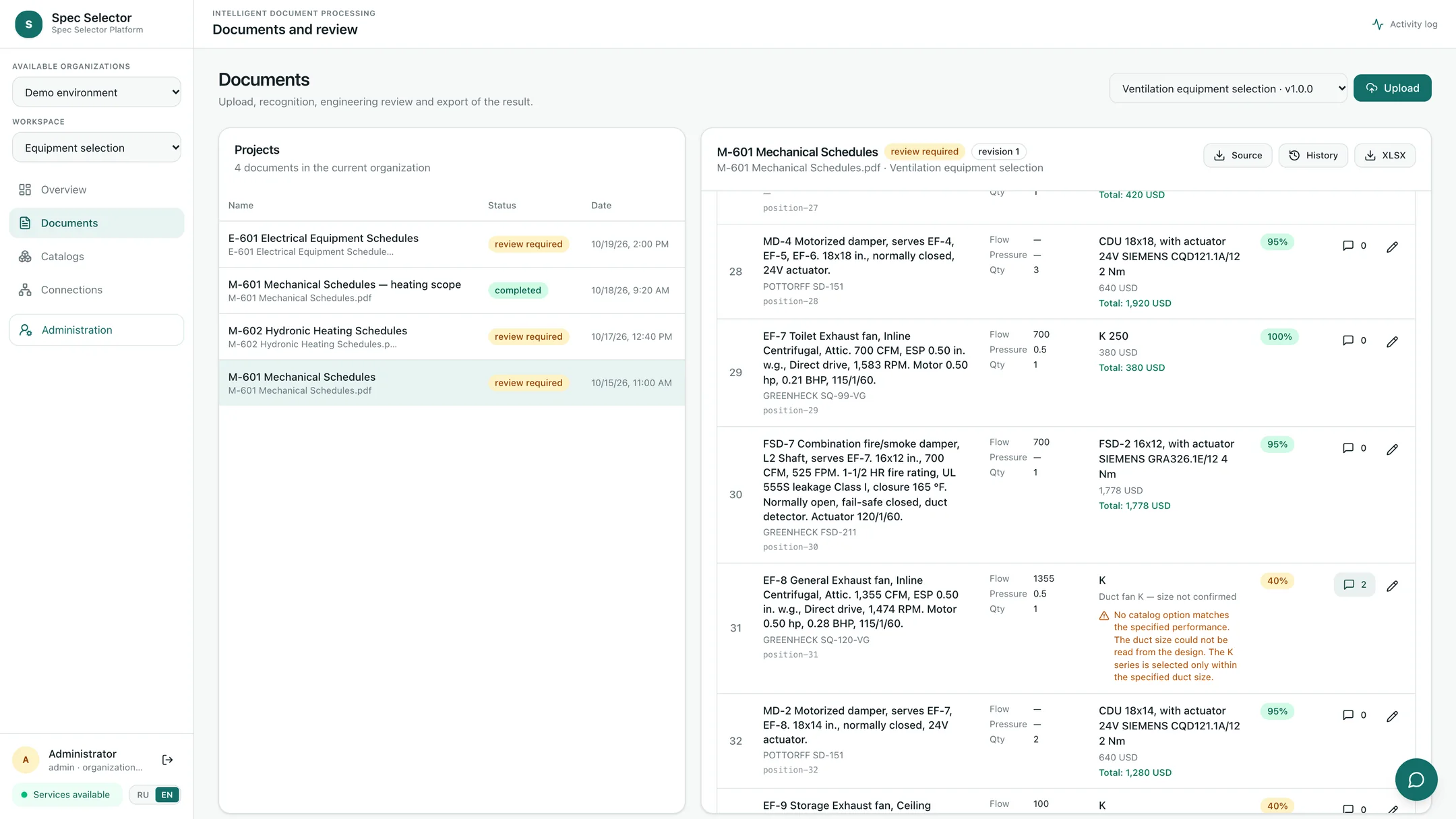
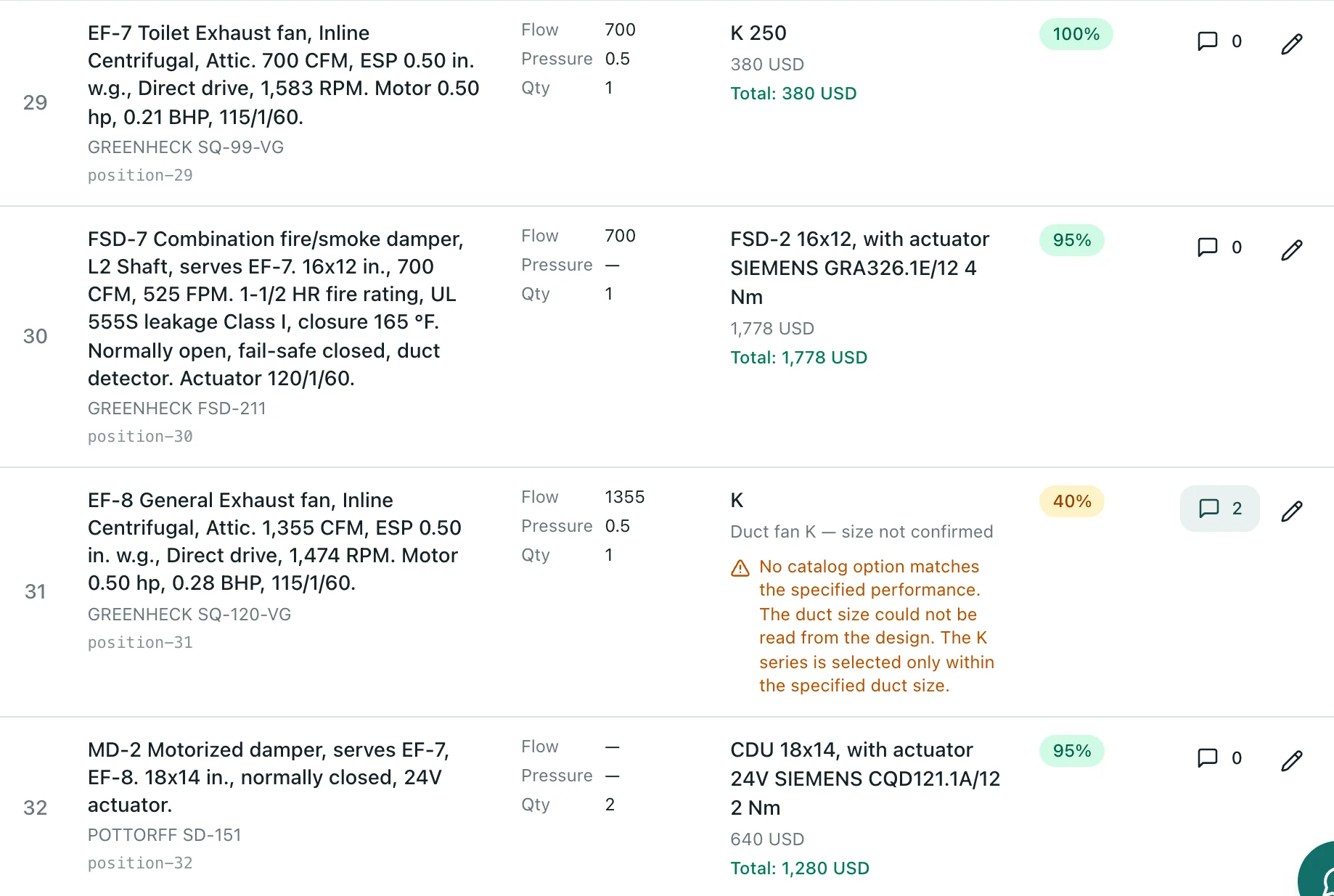
The ventilation module uses the selection rules and catalog proven in Vent Selector: 9 series and about 2,300 models. The duty point is checked against catalog fan curves. In the example, the ventilation scope of sheet M-601 has 33 rows. Of these, 27 are selected by catalog rules with no warnings, 3 packaged air handlers are listed as one line each, and 3 are flagged for review with the reason. EF-8 and EF-9 have no duct size on the schedule, so the fan size cannot be confirmed. The system does not substitute the nearest size; it says so in the row. The engineer confirmed the EF-7 duct size from the ductwork plan and saved the change as a revision.
Heating
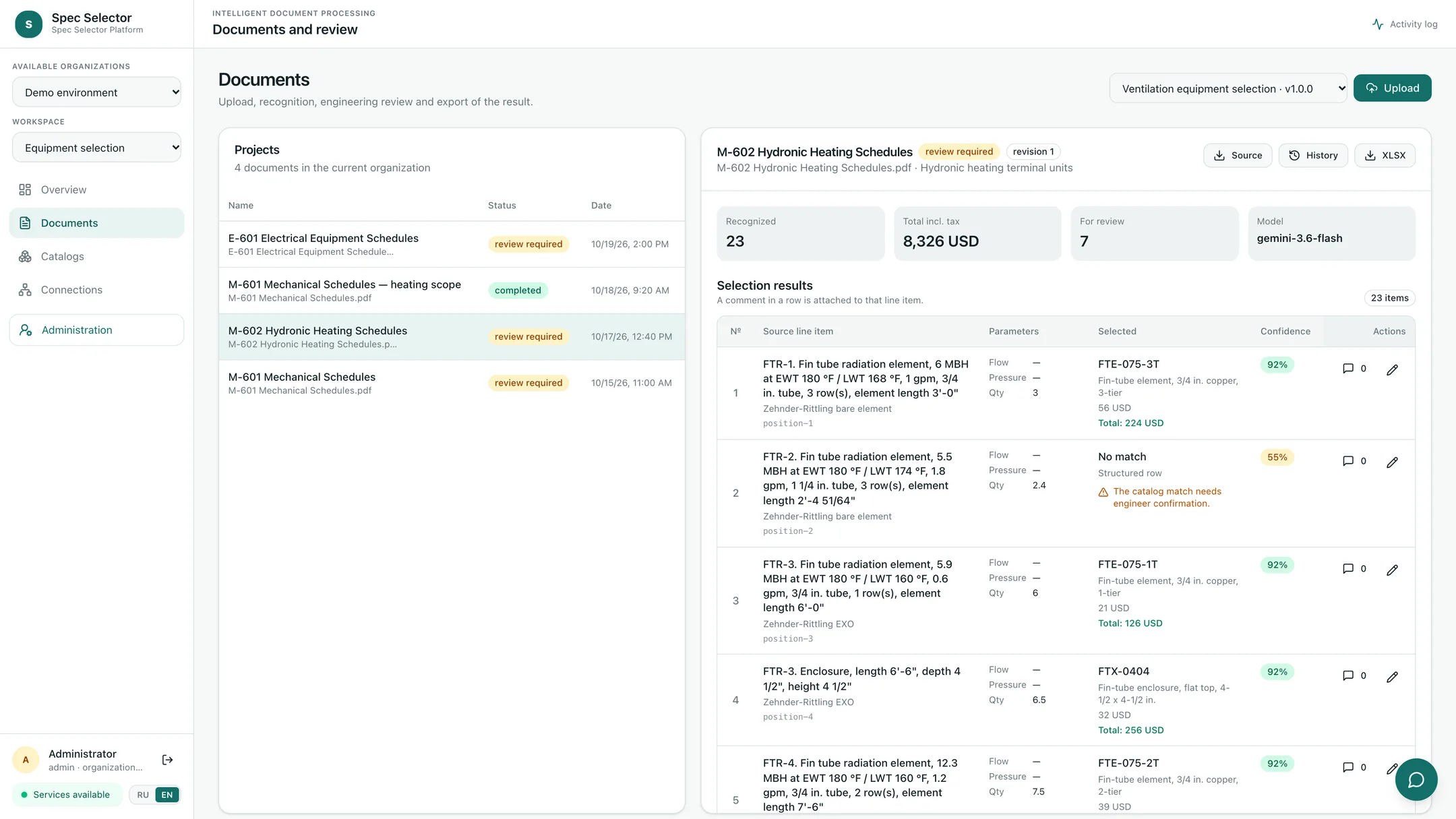
The heating module turns scheduled terminal units into the manufacturer’s items. In the example, FTR-1, a 3/4 in. three-tier fin tube element 3'-0" long, becomes FTE-075-3T; the price list sells elements in 2 ft increments, so 4 linear feet are billed. FTR-4 becomes two items, the element and its enclosure. UH-3, basis of design Modine HC-47, becomes the unit heater of the same size. FTR-2 calls for a 1-1/4 in. tube that the product line does not have, so the row goes to review. Boilers, pumps, and specialties are extracted but are not part of the manufacturer’s scope; the engineer marks them as furnished by others and saves a revision. The cabinet unit heaters scheduled on M-601 are processed by the same heating module.
Electrical
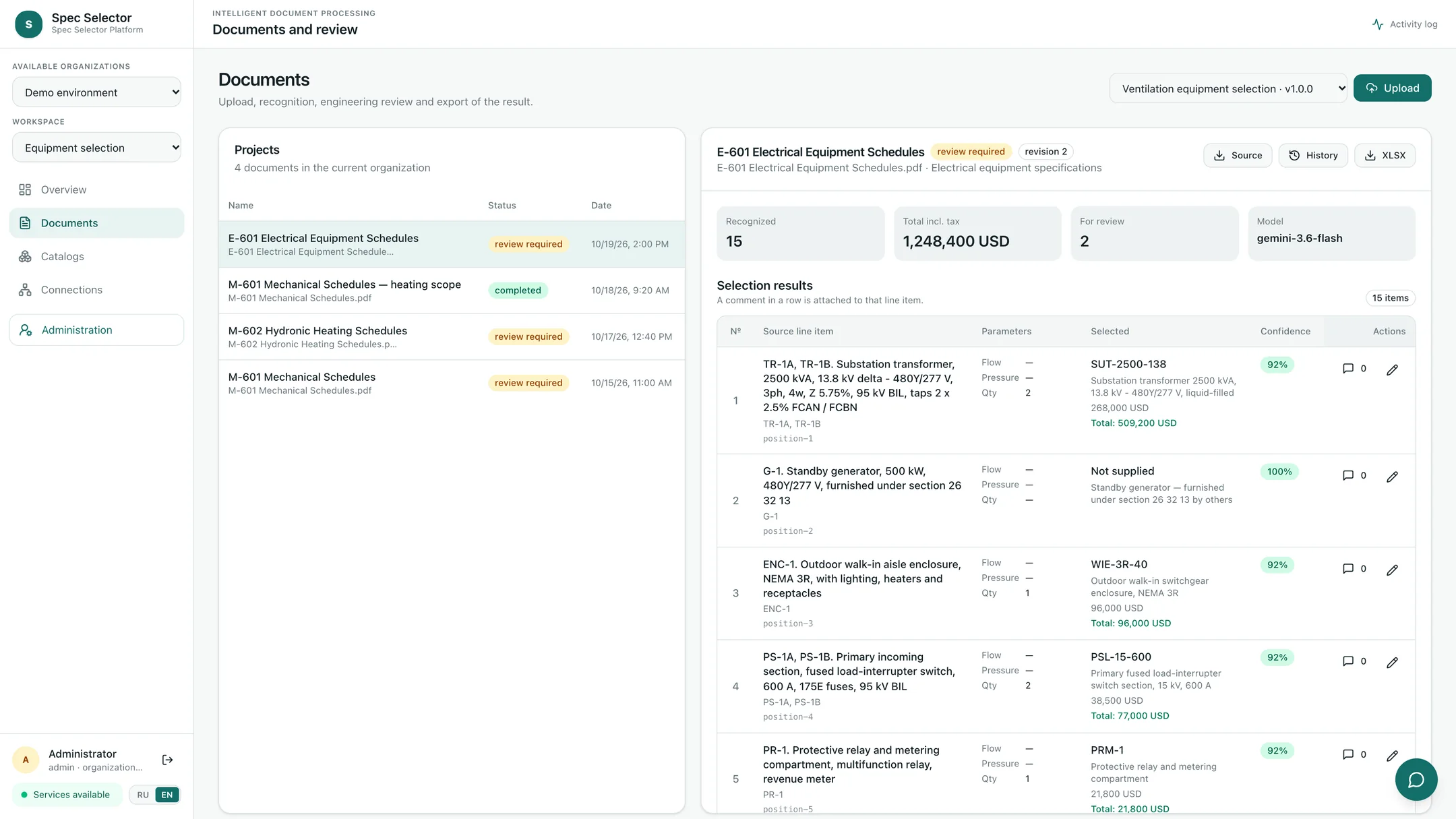
The electrical module matches the line items of the E-601 schedules to the manufacturer’s product line. In the example, two transformers listed in one row become one catalog item with quantity 2. Primary sections, main and tie breakers, and feeder sections are matched by the rating written in the row text. The standby generator row has no quantity and is furnished under another section, so it goes to review; the system does not fill in a missing quantity. A 45 kVA K-13 dry-type transformer is not in the product line and is flagged as well.
Prices, edits, and revisions
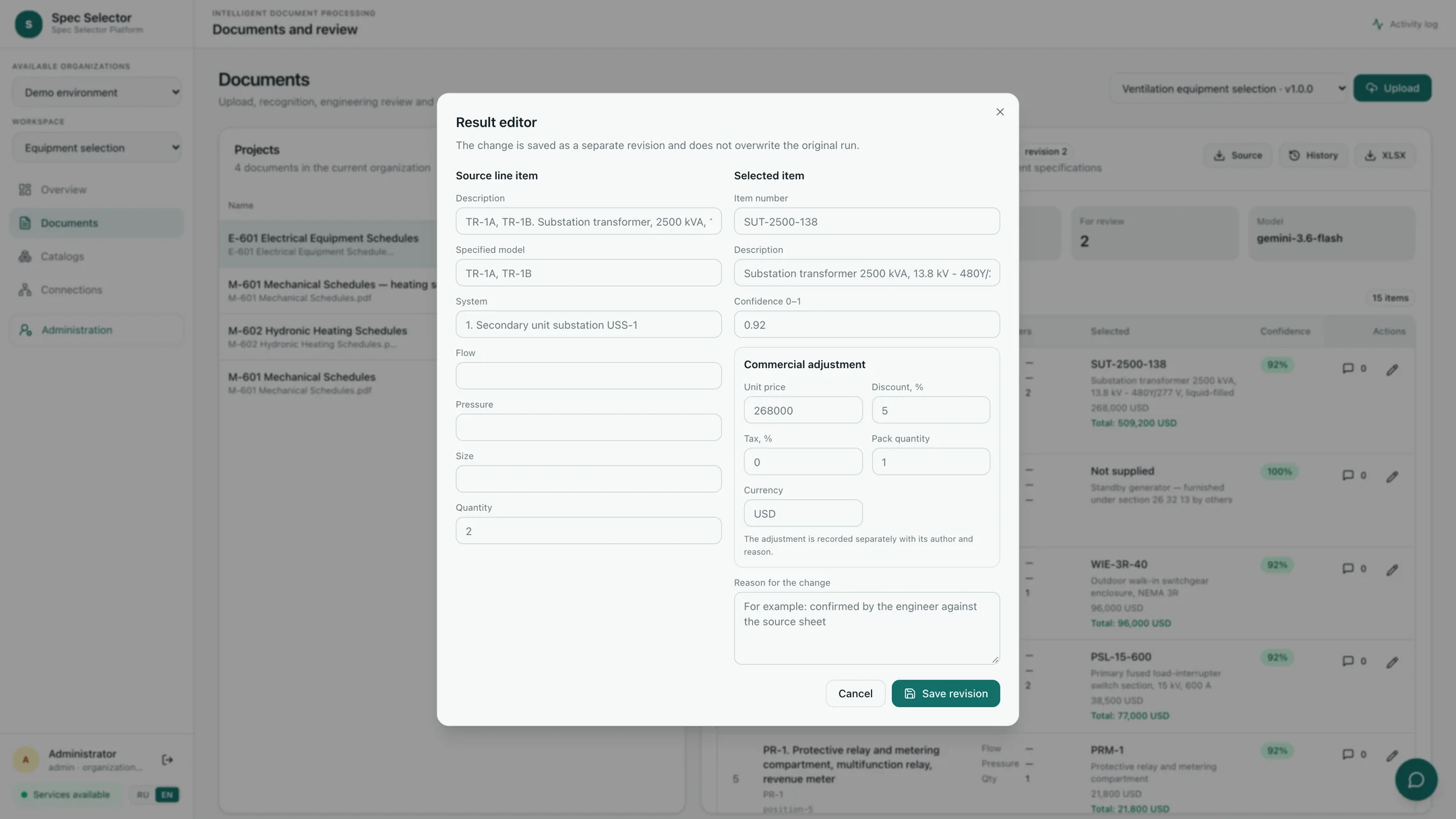
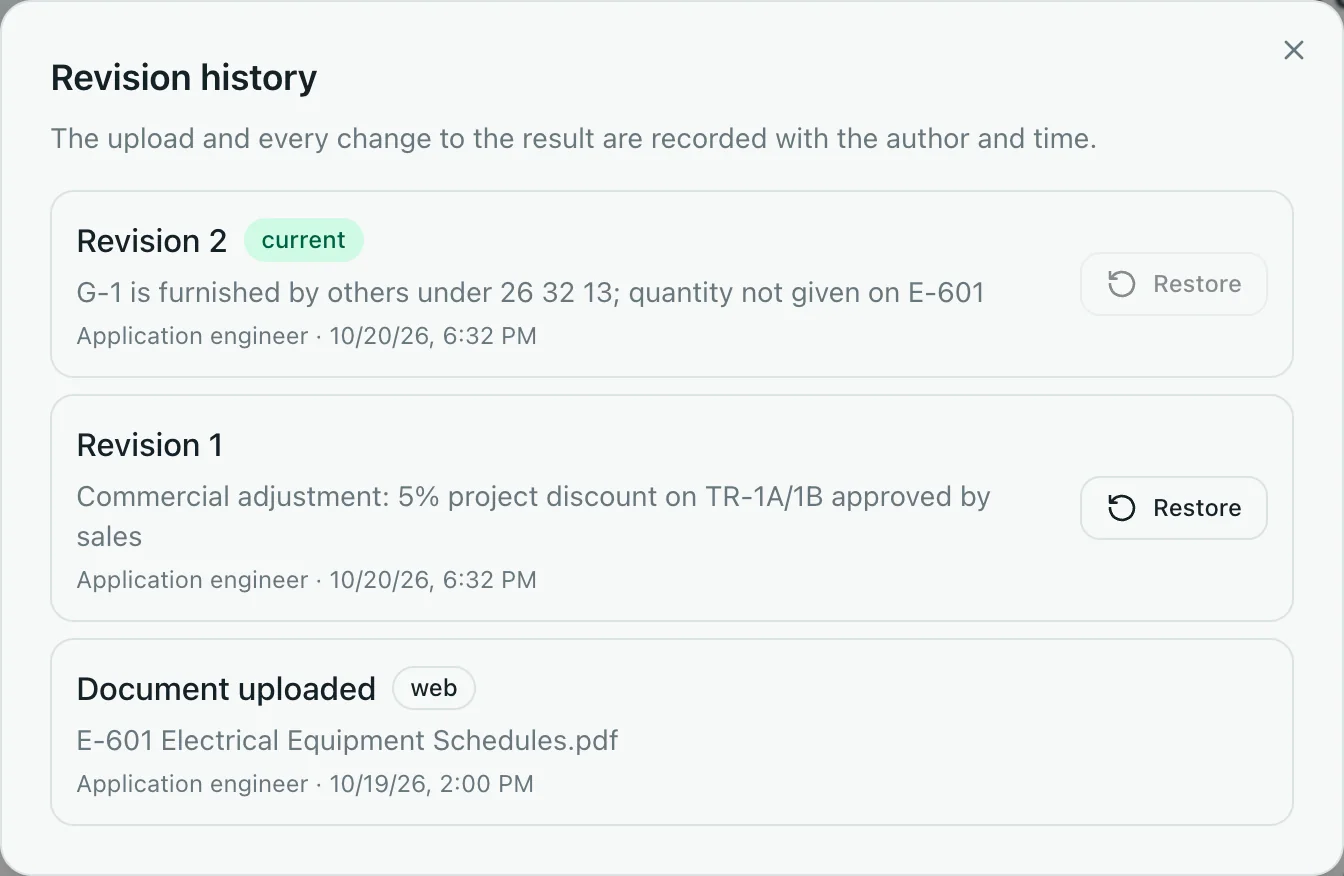
The price is found by the selected item’s number in the active version of the price list. Price lists are loaded from XLSX or CSV and kept in versions. The calculation applies the discount, tax, and pack quantity; availability and lead time come from the price row. The price lists in these examples carry a 0% tax rate, so the “Total incl. tax” column equals the pre-tax amount. The engineer edits a row in the result editor. A manual price adjustment is not saved without a reason. Every edit becomes a separate revision with an author and a time, and the original run does not change. Any earlier version can be restored. Questions about a row go into a comment on that row, and an administrator answers in the same thread.
The XLSX output
The output is an XLSX with the source line item, the selected item, the billable quantity, the price, the amount, and availability. The export is built from the current revision and the active price list version. The same file can be returned through the messenger channel together with a link to the project.
Team and operations
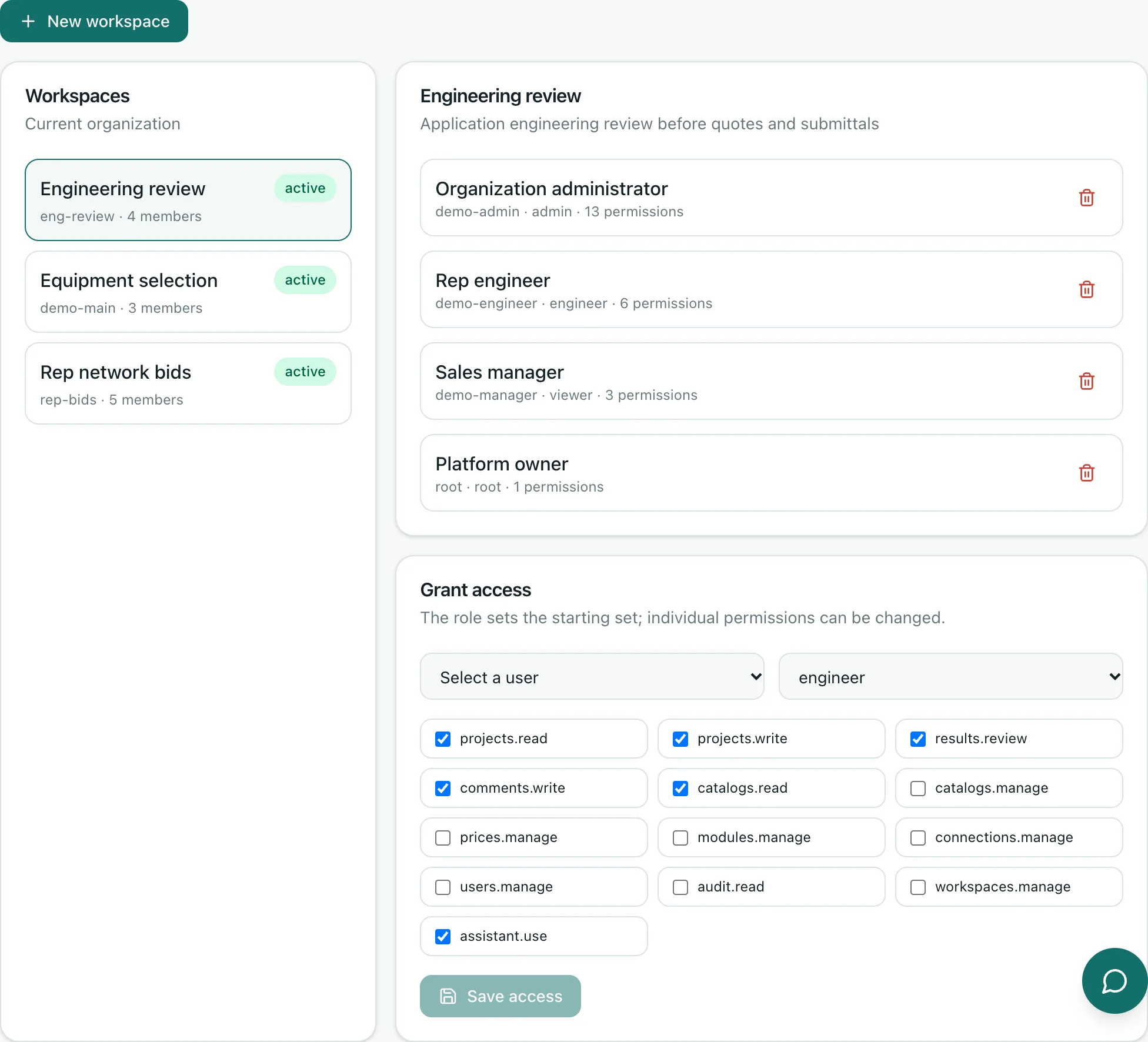
Organizations on the platform are isolated from each other. Inside an organization, there are workspaces for departments and lines of business, for example equipment selection, bids with a rep network, or engineering review. The roles of administrator, manager, engineer, and viewer set the default permissions, and individual permissions can be switched one by one. Processing runs in a background queue with a status, retry on failure, and manual restart. Cost tracking shows model usage, OCR pages, and the estimated cost by period and by project. The audit log records actions on documents, settings, and requests.
Assistant and feedback
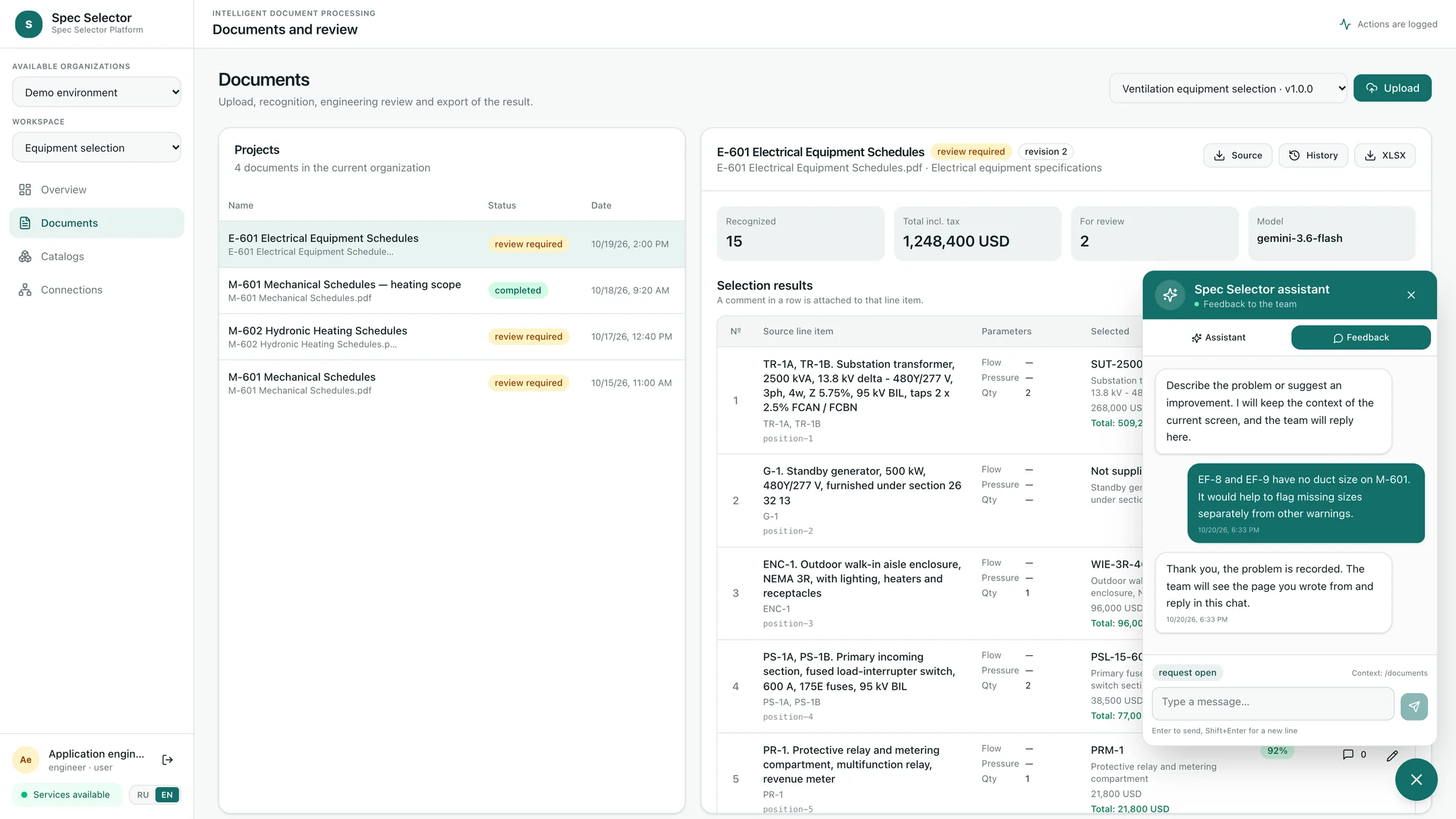
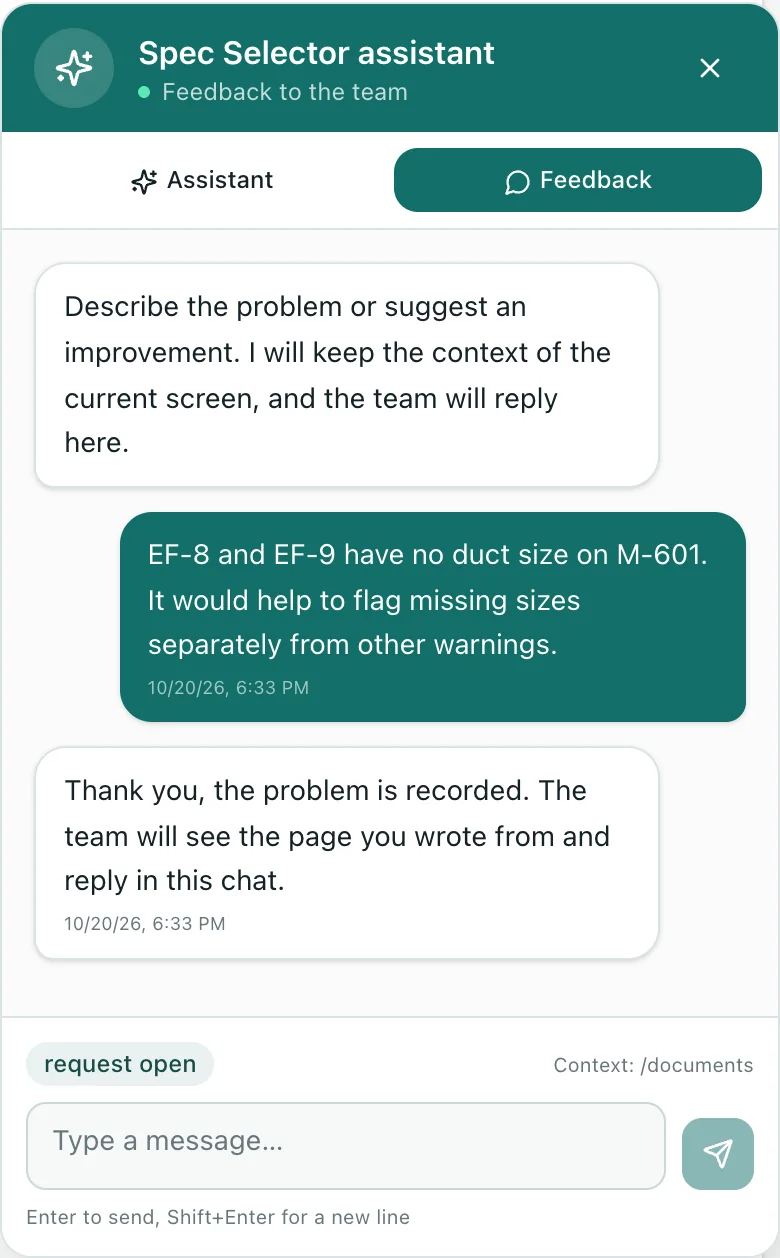
The built-in assistant is available on every screen. In assistant mode, it explains how to choose a module, process a document, adjust a price, and export the result, taking into account the current section and the selected project. The assistant’s knowledge is updated after releases, so it can explain what changed in a new version. In the same window, the user switches to feedback mode and describes a problem or an idea right away. Nobody has to remember the issue later and piece together what happened: the organization, workspace, page, and project are saved automatically. The team works the requests in a shared queue with statuses and answers in the same chat. The platform keeps the request and its context, while the development team clarifies and implements the requirements.
Deploying for a US manufacturer
A deployment loads the manufacturer’s catalog and ratings: AMCA-certified fan ratings, I=B=R fin tube output, UL-listed dampers, and switchgear and transformer ratings. It adds the rules that turn a scheduled tag into the manufacturer’s item, including cross-references from common basis-of-design models. The price list comes in USD with discounts, pack quantities, and lead times. Sample bid sets from the manufacturer’s market tune extraction to US schedule formats and units. Outputs and access are set up to fit: XLSX for quotes, integration with the client’s ERP or accounting system, roles for engineers and reps, and a messenger channel. Intake, recognition, review, revisions, roles, costs, and the audit log stay the same. Code compliance stays with the engineer of record and the authority having jurisdiction. Model codes such as the IMC or the NEC apply only as adopted by a jurisdiction, with local amendments. Listings and certifications belong to the manufacturer’s products, not to the software.
Results
By the partner’s preliminary estimates, selection per document takes 10–20 minutes instead of 1–2 hours. By the same estimates, about half of the documents go through with no manual intervention. This share refers to documents, not to the accuracy of individual rows. These are not US benchmarks. The partner got one system for selection across manufacturers instead of separate software for every manufacturer. A new product line is connected with a catalog, a price list, rules, and a model profile. The engineer stays in control of the result, and feedback from daily use reaches the team together with its context. The screens were captured in a demo environment of the platform with demo catalogs and prices.